Account Settings
Written By Teodora
Last updated 4 days ago
In the "Settings" section, you can update your personal information and customize your profile.
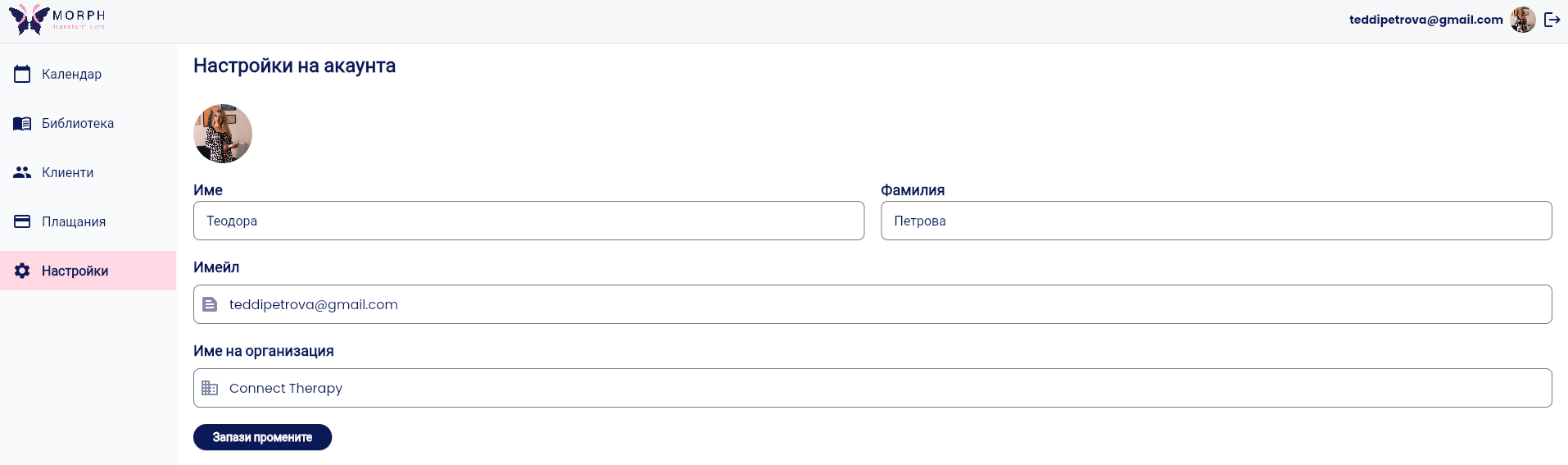
How to Edit Your Profile
1. Go to “Settings” from the main menu.
2. Add a profile picture
Tap the circular photo icon in the top-left corner and upload a photo.
3. Review and update your information
The following fields are automatically filled in upon registration:
First Name
Last Name
Email
Add or update:
Organization Name - enter the name of your practice or clinic
4. Click “Save Changes”
Change email address
[⚠️ PLACEHOLDER: да се провери дали смяната на имейл афектира акаунта - например изисква ли се ново потвърждение, излиза ли потребителят от системата и т.н.]
Was this helpful?
Still need help? Ask the team