How do you create a recurring room reservation in a shared space?
Written By Teodora
Last updated 3 days ago
If you use the same room regularly—for example, every Wednesday—you don't need to reserve it every time. Create a series.
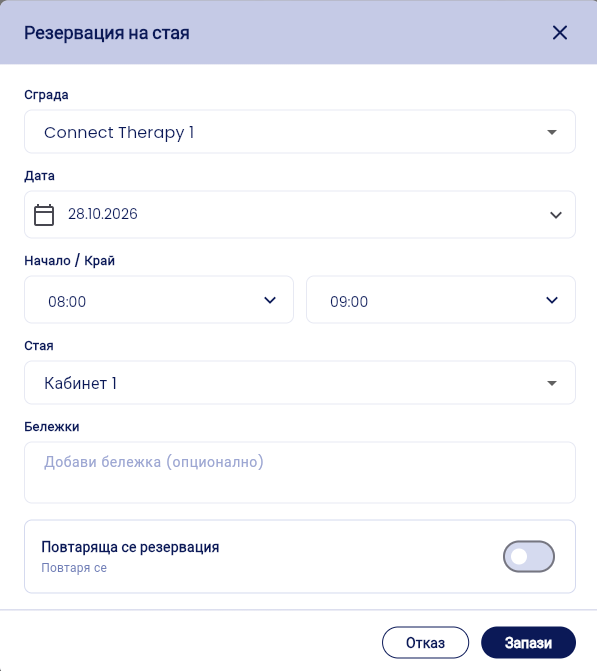
Open the Room Reservation form (see Guide 5).
Enter the building, date, time, and room for the first reservation.
Toggle the “Recurring Reservation” switch.
Under Frequency, select how often it repeats, for example, Weekly.
Under “End of Series,” choose one of the two options: “Until Date” or “After … repetitions” (for example, 5).
Check the blue message. It shows how many reservations will be created and the dates they cover.
In the Preview, you can see all the dates and the room. Tap a row to open it.
Tap Save.
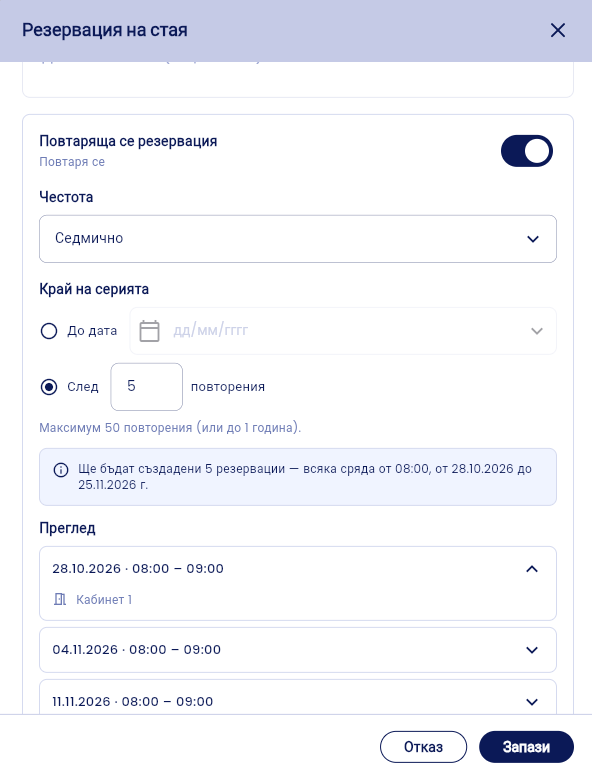
⚠️ The maximum is 50 repetitions or up to 1 year.
💡 If you select “After” and a number of repetitions, you don’t need to set an end date.
VIDEO
If you no longer need the room in the shared office, you can release just one reservation or the entire series.
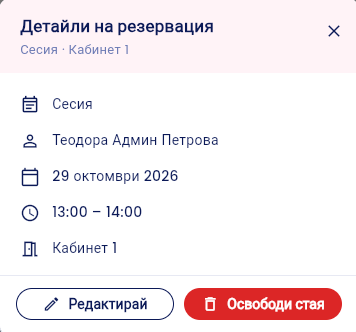
Open the Calendar and tap the room reservation. [Check: the “Rooms” or “Personal” tab, depending on where it appears]
The Reservation Details page will open. You’ll see the type, name, date, times, and room.
Click “Release Room.” Use “Edit” to modify the reservation instead of canceling it.
If the reservation is part of a recurring series, “Cancel Recurring Reservation” will appear. Select the scope:
This one only – cancels only the selected reservation.
This and subsequent—cancels this one and all later ones.
Entire series (starting today)—cancels all future reservations in the series.
Cancel – closes without making any changes.

💡 Past appointments remain unchanged. They stay in the calendar as they are.
⚠️ Before you click, check the scope: “The entire series” frees up the room for all future dates.
📎 Related article: How to create a recurring reservation in a shared space?
VIDEO
Was this helpful?
Still need help? Ask the team